Sales order
CV-2026-0142
Example Customer Ltd · 12 × PC-40Order total incl. VAT: €21,054.00
- Produced
- 0 / 12
- Delivered
- 0 / 12
- Invoiced
- 0 / 12
Linked documents
- OF-2026-0318
- OP-0311
- AV-0587 · 8/12
- NOP-2026-00418
ERP · SALES · PURCHASING · STOCK · PRODUCTION · ASSETS
R&D COPILOT ERP runs sales, purchasing, multi-warehouse stock, production and fixed assets in one system, for companies with one legal entity or several. Invoicing, accounting and reporting read from the same records, with e-Factura and SAF-T built in for companies operating in Romania.
Sales order
CV-2026-0142
Example Customer Ltd · 12 × PC-40Order total incl. VAT: €21,054.00
Linked documents
An ERP (enterprise resource planning) system keeps sales, purchasing, stock, production, assets and finance in one database, so every team works from the same order instead of its own spreadsheet. R&D COPILOT ERP is that system for small and mid-sized companies. We implement it around your processes and host it in the EU.
01 / MODULES
Each module creates its own documents and hands them to the next. Pick one to read how it works.
Quotations, orders, partial deliveries and invoices.
→ Stock → Finance
02 PURPurchase requests, supplier orders and approvals with amount limits.
→ Stock → Finance
03 STKSeveral warehouses, batches and serial numbers, transfers and stocktakes.
← Purchasing · → Sales, Production
04 PRDBills of materials, work orders and timesheets.
← Sales · → Stock
05 ASTAsset register with depreciation schedules.
→ Finance
06 FINInvoicing, accounting entries and tax reporting inputs. Romania pack: e-Factura and SAF-T (D406).
← every module
All six modules work across several companies. See how
02 / WHO IT IS FOR
The same six modules, set up around the way your business moves goods and work. These are example flows, not customer stories.
Stock lives in more than one place and orders ship in parts. Reserve from the right warehouse, deliver what is ready and keep the rest open on the order.
You build to order or to stock from a known list of parts. The bill of materials reserves components, shortages become purchase requests, and finished goods return to stock with their lot.
Work happens on site and materials leave with the team. Service jobs record hours and the serial numbers of what was installed, then go to invoicing.
Two or more companies share one system but keep their own documents, series and warehouses. Roles decide who works in one company and who sees all of them.
03 / ORDER FLOW
This is the path a make-to-order sales order follows. Nobody copies it between spreadsheets, and the original order stays attached at each step.
01 / 07 · CRM
A won opportunity in R&D COPILOT CRM arrives with the customer and the agreed scope.
CRM-OPP-2207 · Won
R&D COPILOT CRM
02 / 07 · 01 SAL
The quotation is built from your price lists and sent for acceptance.
OF-2026-0318 · Accepted
↳ from CRM-OPP-2207
03 / 07 · 01 SAL
The accepted quotation becomes an order without retyping a line.
CV-2026-0142 · 12 × PC-40
↳ from OF-2026-0318
04 / 07 · 04 PRD
The order needs 12 panels, so a work order reserves the components and records the hours.
OP-0311 · 12 × PC-40 · lot L-1207
↳ from CV-2026-0142
05 / 07 · 03 STK
Finished panels enter Warehouse A and are reserved for the order. Deliver everything or part of it; the rest stays open.
RES L-1207 · 12 pcs → AV-0587 · 8 of 12
↳ from CV-2026-0142
06 / 07 · 06 FIN
The 8 delivered panels are invoiced through R&D COPILOT e-Factura, with validation and status tracking.
NOP-2026-00418 · €14,036.00 · ✓ Validated
↳ from CV-2026-0142
07 / 07 · 06 FIN
The accounting entry lands with the order attached; the same record feeds reports and SAF-T (D406).
4111 14,036.00 = 701 11,600.00 + 4427 2,436.00
↳ from CV-2026-0142
01 SALSales
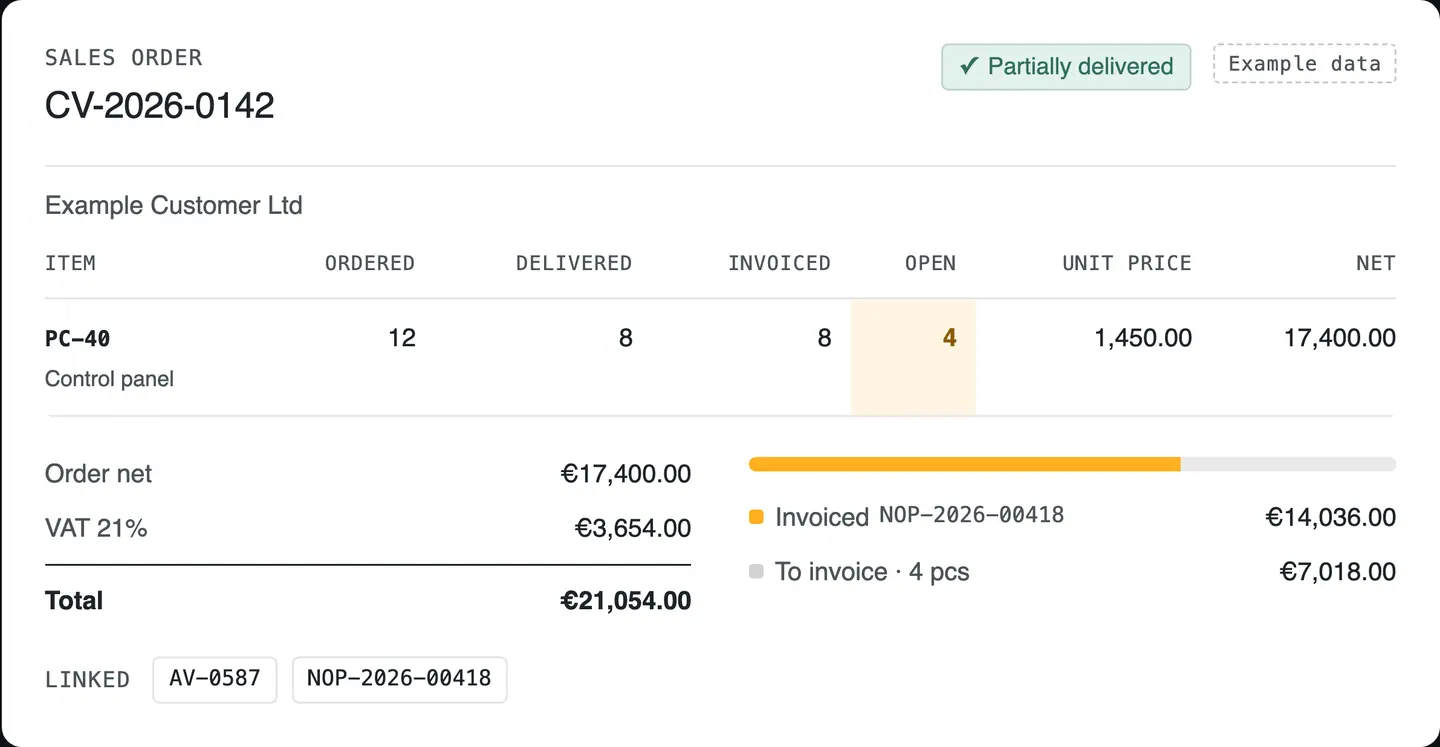
Quotations become orders, orders become deliveries, and deliveries become invoices. Partial deliveries stay visible until the last unit leaves the warehouse, and you invoice what actually left.
Sales order
CV-2026-0142
Example Customer Ltd
| Item | Ordered | Delivered | Invoiced | Open | Unit price | Net |
|---|---|---|---|---|---|---|
| PC-40Control panel | 12 | 8 | 8 | 4 | 1,450.00 | 17,400.00 |
LinkedAV-0587NOP-2026-00418
03 STKStock
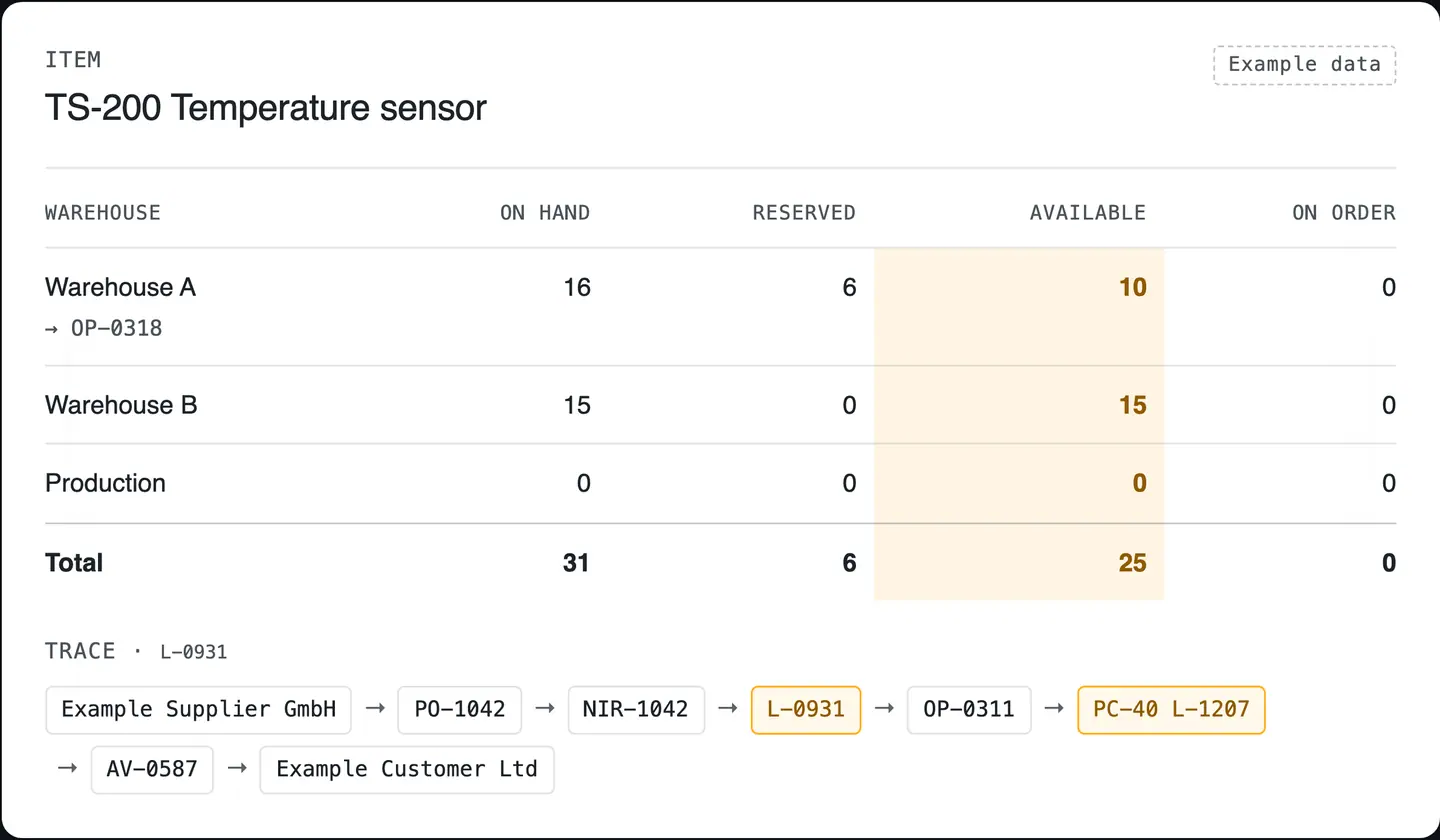
See what is on hand, reserved and on order in each warehouse. Batches and serial numbers follow the goods from receipt to delivery, so you can trace any unit back to its supplier.
Item
TS-200 Temperature sensor
| Warehouse | On hand | Reserved | Available | On order |
|---|---|---|---|---|
| Warehouse A→ OP-0318 | 16 | 6 | 10 | 0 |
| Warehouse B | 15 | 0 | 15 | 0 |
| Production | 0 | 0 | 0 | 0 |
| Total | 31 | 6 | 25 | 0 |
Trace · L-0931
04 PRDProduction & service
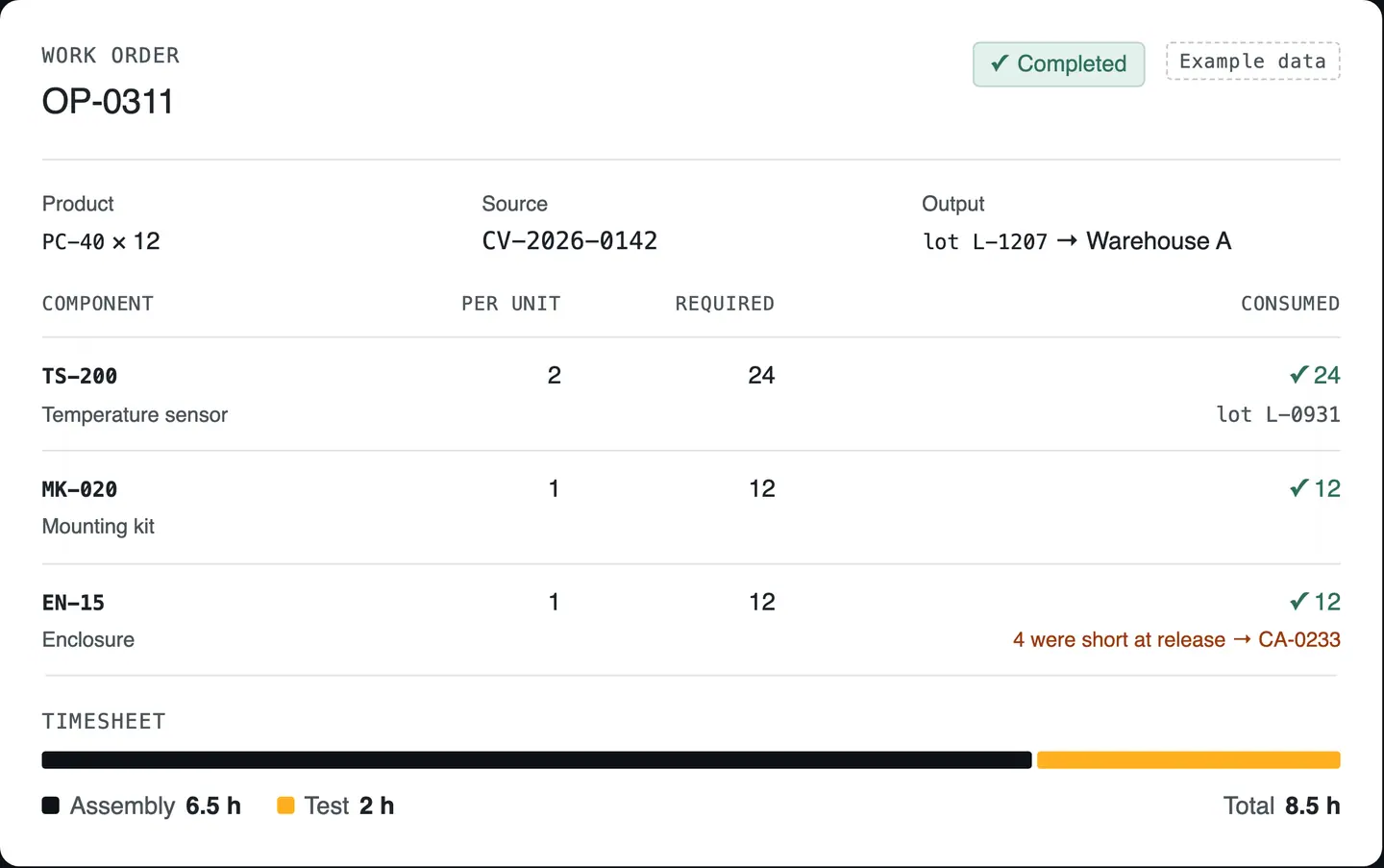
Bills of materials say what goes into each product. Work orders reserve the components, timesheets record the hours, and finished goods return to stock with their batch.
Process types
Work order
OP-0311
| Component | Per unit | Required | Consumed |
|---|---|---|---|
| TS-200Temperature sensor | 2 | 24 | 24lot L-0931 |
| MK-020Mounting kit | 1 | 12 | 12 |
| EN-15Enclosure | 1 | 12 | 124 were short at release → CA-0233 |
Timesheet
05 ASTFixed assets
Keep every asset with its location, the person responsible and its documents, and see its depreciation schedule month by month.
Fixed asset
MF-0042 · CNC router
| Month | Depreciation | Remaining value | Status |
|---|---|---|---|
| Aug 2026 | €1,500.00 | €136,500.00 | Posted |
| Sep 2026 | €1,500.00 | €135,000.00 | Posted |
| Oct 2026 | €1,500.00 | €133,500.00 | Scheduled |
Accounting entry 6811 = 2813 · €1,500.00
Accounting and tax depreciation are agreed with your accountant during implementation.
06 FINFinanceLocalisation: Romania
Every invoice and accounting entry keeps its source document attached, so reports and tax filings start from the same records your team works in. For companies operating in Romania: invoices leave through R&D COPILOT e-Factura and keep their validation status on the original document, and SAF-T (D406) is prepared through R&D COPILOT Declarations.
Customer invoice
NOP-2026-00418
e-Factura status
Accounting entry
| Account | Debit | Credit |
|---|---|---|
| 4111Customers | 14,036.00 | |
| 701Revenue from sale of finished goods | 11,600.00 | |
| 4427Output VAT | 2,436.00 |
AttachedCV-2026-0142AV-0587
02 PURPurchasing
A purchase request goes through the approval steps you set, becomes a supplier order and is checked against what actually arrived before the invoice reaches finance.
Matching an invoice when the supplier delivers only part of an order
Supplier order PO-1042
Foreign supplier · EURSupplier
Example Supplier GmbH
Sensor installation · Warehouse A
| Item | Ordered | Received | Unit price | Net |
|---|---|---|---|---|
| Temperature sensorTS-200 | 40 | 0 | €80.00 | €3,200.00 |
| Mounting kitMK-020 | 20 | 0 | €25.00 | €500.00 |
Review €3,700.00 in goods, then release the order for receiving. All amounts exclude VAT.
Supplier order drafted. Waiting for the purchasing owner.
Try it: approve the order, record a partial receipt and resolve the invoice difference. Example data
04 / THE PRODUCT
Four screens from the same example records: the supplier invoice matched against a partial receipt, stock traced lot by lot, the work order behind the panels, and an invoice between two of your companies.
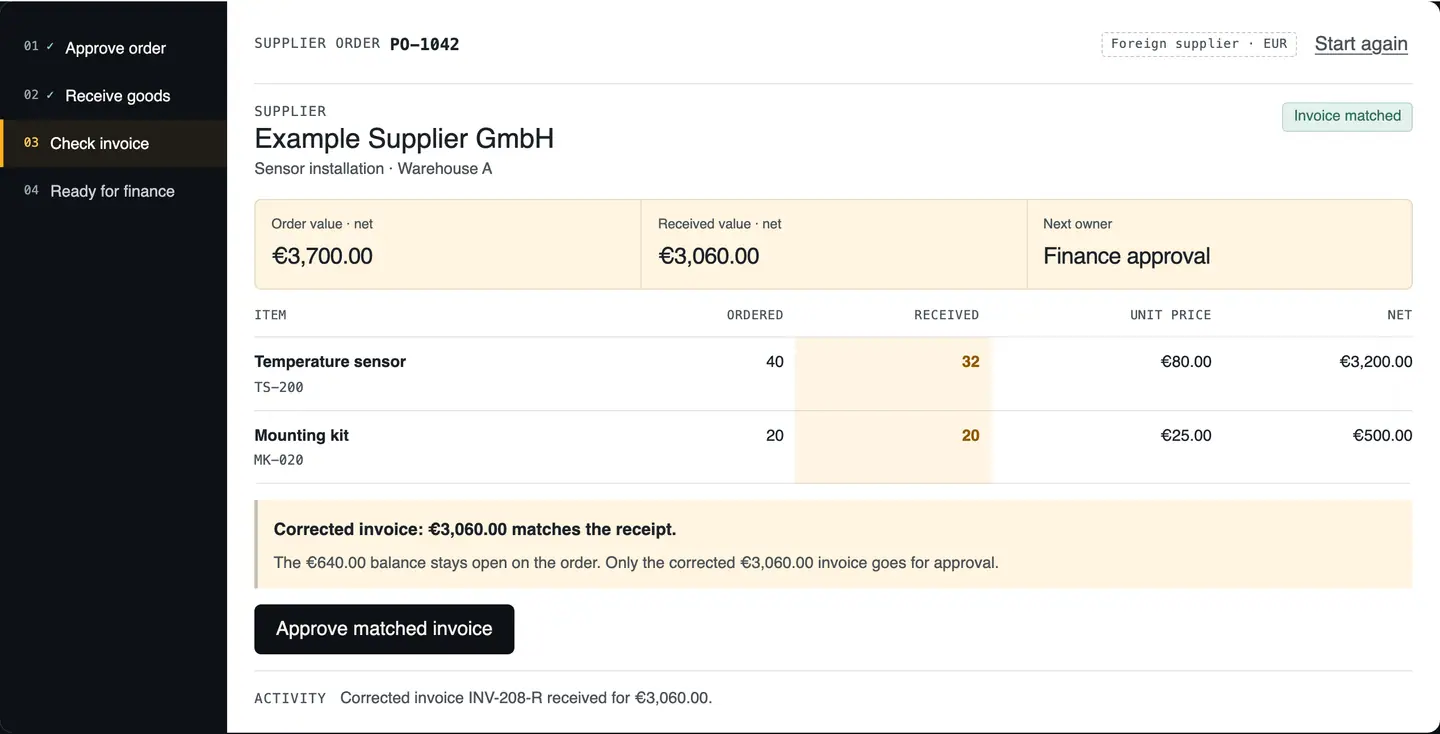
R&D COPILOT ERP · example data Invoice approved for 3,060 euro against the partial receipt; 8 sensors stay open on PO-1042. Open the full screen (opens in a new tab)
R&D COPILOT ERP · example data TS-200 on hand, reserved and available per warehouse, with lot L-0931 traced from supplier to customer. Open the full screen (opens in a new tab)
R&D COPILOT ERP · example data Work order OP-0311 consumes the bill of materials from stock by lot and books assembly and test time against the order. Open the full screen (opens in a new tab)
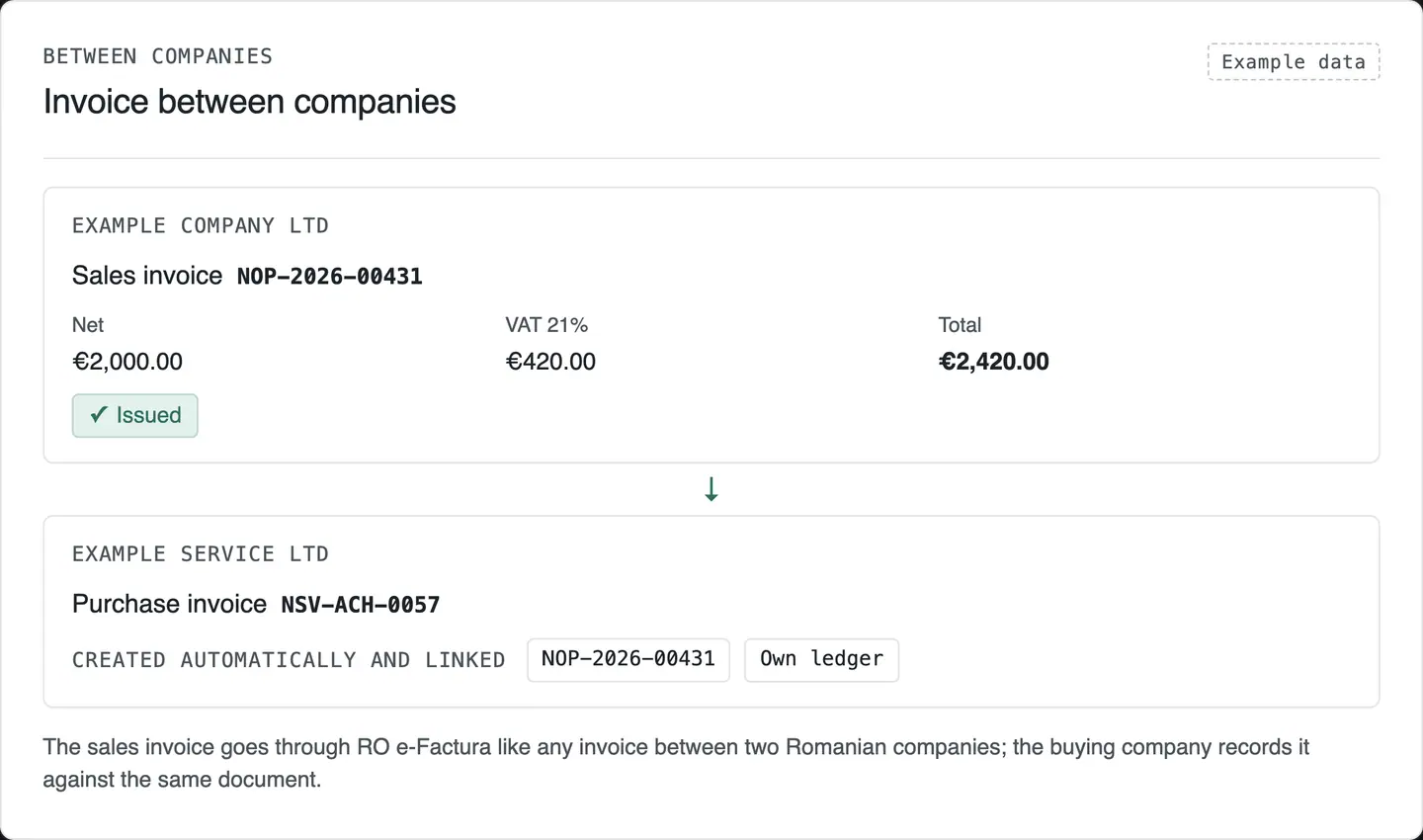
R&D COPILOT ERP · example data A sales invoice in one company creates the linked purchase invoice in the other; each keeps its own ledger. Open the full screen (opens in a new tab)
05 / MULTI-COMPANY
Run several companies in the same ERP. Each keeps its own documents, numbering and warehouses, and roles decide who works in one company and who sees all of them.
Active company
Example Company Ltd
Roles & permissions
Example Company Ltd
| Role | View | Create | Approve | Change |
|---|---|---|---|---|
| Sales | Yes | Yes | No | Yes |
| Warehouse | Yes | Yes | No | No |
| Accountant | Yes | No | No | No |
| Manager | Yes | Yes | Yes | Yes |
Change history
Recent changes
Unit price 1,400.00 to 1,450.00
Delivered quantity 0 to 8
Approval step 1 to 2
Between companies
Invoice between companies
Example Company Ltd
Sales invoice NOP-2026-00431
Example Service Ltd
Purchase invoice NSV-ACH-0057
Created automatically and linkedNOP-2026-00431Own ledger
The sales invoice goes through RO e-Factura like any invoice between two Romanian companies; the buying company records it against the same document.
06 / CONNECTED
Each connection passes a specific record. Integrations with your existing tools are scoped and tested in the project, not assumed.
What passes: Won opportunities become orders, with the customer and scope.
What passes: Invoices go out and their status comes back to the document.
What passes: Entries arrive with the source document attached.
What passes: SAF-T (D406) is prepared from the same records.
What passes: Employee records and leave; checked inputs for payroll.
What passes: Dashboards and exports that keep the source document attached.
What passes: Stock levels and receipts stay in sync with the ERP warehouses, scoped per project.
What passes: Field and warehouse apps work on the same orders through the ERP’s REST API.
Approvals, alerts and repeat tasks are automated inside the ERP. Flows that reach Microsoft 365, UiPath or other systems you already run go through R&D COPILOT Integrations.
07 / WHY ONE SYSTEM
| What you need | Spreadsheets | Separate tools | R&D COPILOT ERP |
|---|---|---|---|
| Order entered once, reused to the ledger | No, copied by hand | Partial, re-entered between tools | Yes |
| Stock reserved for the order | Manual | Depends on the tool | Yes, per warehouse, batch and serial |
| Tax reporting from the same records | Rebuilt by hand | Exported and merged | Yes, with the source document attached |
| Several companies with separate numbering | Separate files | Separate accounts | Yes, in one system |
| Localisation: Romania | |||
| e-Factura status on the original invoice | No | Separate portal | Yes, through R&D COPILOT e-Factura |
| SAF-T (D406) from the same records | Rebuilt by the accountant | Exported and merged | Prepared through R&D COPILOT Declarations |
08 / DATA AND CONTROL
What we run for you, and what stays in your hands.
EU HOSTING
Hosted in the EU and kept up to date, as part of the monthly subscription.
BACKUPS
Daily encrypted backups, stored in the EU and included in the subscription.
ROLES
Roles and permissions per company decide who sees, creates, approves or changes each document.
HISTORY
Every change keeps who made it, when, and the value before and after.
API
A REST API for every record type, with integrations scoped and tested per project.
IN WRITING
Data access, backup, retention and operational responsibilities are agreed in writing during implementation.
YOUR DATA, PORTABLE
Export your records to CSV or Excel at any time. If you leave, you receive a complete export in a documented format.
09 / IMPLEMENTATION
The timeline is agreed with you after the first workshop. Each step ends with something your team can check.
You get The first order flow, its owners, approval steps and exceptions, written down.
You get Companies, warehouses, document series, roles and approvals set up in your ERP.
You get Customers, suppliers, items and opening stock imported, with a rehearsal you can check.
You get e-Factura, accounting and the connections you need, tested on your own documents.
You get Process owners trained on real scenarios; acceptance agreed before go-live.
You get You go live; we host it in the EU, keep it updated and support you from the team that implemented it.
10 / PRICING
There are no published prices, because the cost depends on modules, companies, users and data migration. You receive a written quote once the first workflow is mapped.
ONE-OFF
Paid once, quoted after the first order flow is mapped.
Covers
MONTHLY
EU hosting, updates, daily encrypted backups and support from the team that implements it.
Included
AS NEEDED
A fixed hourly rate, agreed before any work starts.
Covers
11 / QUESTIONS
It is built for small and mid-sized companies, from one company with a single warehouse to groups with several companies and warehouses. We start with the order flow that matters most to you and add modules when the team is ready.
Every project starts with a short call. We agree the workflows, users, data migration, integrations and acceptance criteria, then set up your ERP.
No. We host the ERP in the EU, keep it updated and run daily encrypted backups as part of the monthly subscription. Your team needs a current web browser and someone who owns each process.
It depends on the number of modules, companies and how clean your data is. We agree the timeline after the process-mapping workshop, and the first order flow goes live before the rest is added.
Training is part of the implementation fee: process owners learn on real scenarios before go-live. After that, support is included in the monthly subscription, and any extra training is agreed at the fixed hourly rate.
Yes. Stock is kept per warehouse, with transfers, reservations, stocktakes and batch and serial tracking from receipt to delivery.
Yes. Several companies live in one system, each with its own documents, series and warehouses, and roles and permissions decide who sees what.
Invoices go through R&D COPILOT e-Factura with validation and status tracking. Entries reach Romanian accounting with the source document attached, and SAF-T (D406) is prepared through R&D COPILOT Declarations. Fiscal outputs are reviewed with your accountant before go-live. Invoices are sent to RO e-Factura as soon as they are issued, well inside the 5-working-day deadline.
No. We map your current process and keep what works. Integrations with CRM, stock and accounting tools are scoped and tested one by one, through the REST API where needed.
A one-off implementation fee, then a monthly subscription that covers EU hosting, updates, daily encrypted backups and support; extra work is billed at a fixed hourly rate. Data access, backup, retention and responsibilities are agreed in writing during implementation.
You can export your records to CSV or Excel at any time. If you move to another provider, we hand over a complete export of your data in a documented format, as the EU Data Act requires for cloud services.
A first call covers your companies, warehouses and the order flow you want to start with. You leave with a scoped first flow and a written quote, not a sales pitch.
From idea to implementation
Plan an ERP implementation around one complete order flow, with clear ownership, dependable master data and practical checks before expanding to more modules.
Read guidePrepare an ERP migration rehearsal with identity mapping, record checks, movement cutoffs and recovery decisions your sales, warehouse and finance teams can verify.
Read guideConnect purchase orders, partial receipts and supplier invoices in a reviewable ERP workflow, with clear discrepancy owners and evidence for the finance handoff.
Read guide© 2026 R&D COPILOT Made in EU Contact form